Getting Started
Native Simple ads are a type of native ad that displays a single standalone image.
NAMSDK Import
Import the SDK module.
- Swift
- Objective-C
import GFPSDK
@import GFPSDK;
Initializing the Native Ad Provider
Initialize via GFPAdManager after adding the Pod for the native ad provider you want to integrate to your project. (Perform only once when the app starts.)
| Provider Option | Ad Provider | CocoaPods |
|---|---|---|
| GFPNativeProviderOptionNDA | Naver NDA | pod 'GFPSDK/MediationNDA' |
| GFPNativeProviderOptionLAN | LINE Ads Network | pod 'GFPSDKMediationLAN' |
- Swift
- Objective-C
// DFP, NDA, Inmobi, Facebook 광고를 연동하려는 경우 cocoapods 의존성 추가.
GFPAdManager.setup(withPublisherCd: "publisherCd") { (error : GFPError?) in
    print("Setup Eror: \(String(describing: error?.description))")
}
// DFP, NDA, Inmobi, Facebook 광고를 연동하려는 경우 cocoapods 의존성 추가.
[GFPAdManager setupWithPublisherCd:@"publisherCd" completionHandler:^(GFPError * _Nullable error) {
    NSLog(@"Setup ERROR: %@", error);
}];
For detailed GFPAdManager configuration, refer to Ad Manager Settings.
Writing the View Controller
Create a view controller (MyViewController) and perform the following steps in the header file (MyViewController.h).
(In this example, a single view controller implements all event protocols.)
- Declare a GFPAdLoader *adLoader property on the view controller.
- Implement the GFPAdLoaderDelegate protocol on the view controller.
- Declare a GFPNativeSimpleAd *nativeSimpleAd property on the view controller.
- Implement the GFPNativeSimpleAdDelegate protocol on the view controller.
GFPAdLoaderDelegate delivers events related to native (and banner) ad loading, while GFPNativeSimpleAdDelegate delivers events such as impressions, clicks, and rendering errors for the loaded native ad object.
- Swift
- Objective-C
// MyViewController.h
import GFPSDK

class MyViewController : UIViewController, GFPAdLoaderDelegate, GFPNativeSimpleAdDelegate {
    private var adLoader : GFPAdLoader?

    private var nativeSimpleAd : GFPNativeSimpleAd?
    private var nativeSimpleAdView : GFPNativeSimpleAdView?
}
// MyViewController.h

@import GFPSDK;

@interface MyViewController : UIViewController <GFPAdLoaderDelegate, GFPNativeSimpleAdDelegate>

@property (nonatomic) GFPAdLoader *adLoader;

@property (nonatomic) GFPNativeSimpleAd *nativeSimpleAd;
@property (nonatomic) GFPNativeSimpleAdView *nativeSimpleAdView;

@end
Creating GFPAdLoader and Requesting an Ad
In the viewDidLoad method of MyViewController.m, create an instance of GFPAdLoader and request an ad.
- When creating a GFPAdLoader instance, set user information in GFPAdParam along with your issued ad unit ID. GFPAdParam is used for targeting to improve ad performance.
- Swift
- Objective-C
override func viewDidLoad() {
    super.viewDidLoad()

    let adParam = GFPAdParam()
    adParam.yearOfBirth = 1990
    adParam.gender = .male
    ...

    self.adLoader = GFPAdLoader(unitID: "UnitId", rootViewController: self, adParam: adParam)

    let nativeSimpleOption = GFPAdNativeSimpleOptions()
    nativeSimpleOption.simpleAdRenderingSetting = ... // Rendering settings for the native simple ad to be loaded
    self.adLoader?.setNativeSimpleDelegate(self, nativeSimpleOptions: nativeSimpleOption)

    self.adLoader?.delegate = self
    self.adLoader?.loadAd()
}
- (void)viewDidLoad {
    [super viewDidLoad];

    GFPAdParam *adParam = [[GFPAdParam alloc]init];
    adParam.yearOfBirth = 1990;
    adParam.gender = GFPAdParamGenderTypeMale;
    ...

    self.adLoader = [[GFPAdLoader alloc] initWithUnitID:self.unitID
                                             rootViewController:self
                                                        adParam:adParam];

    GFPAdNativeSimpleOptions *nativeSimpleOptions =  [[GFPAdNativeSimpleOptions alloc] init];
    nativeSimpleOptions.simpleAdRenderingSetting = ...; // Rendering settings for the native simple ad to be loaded
    [self.adLoader setNativeSimpleDelegate:self nativeSimpleOptions:nativeSimpleOptions];

    // Request ad
    self.adLoader.delegate = self;
    [self.adLoader loadAd];
}
On a successful ad request, the adLoader:didReceiveNativeSimpleAd: method of GFPAdLoaderDelegate is called.
GFPAdLoaderDelegate
By implementing GFPAdLoaderDelegate, you can receive ad load-related events through the corresponding methods.
On Load Success
When a native ad loads successfully, a GFPNativeSimpleAd object is returned as the response.
The GFPNativeSimpleAd object is used to create the native ad view (UIView).
For details on how to construct the native ad view using the GFPNativeSimpleAd object, see the native ad view creation section.
- Swift
- Objective-C
func adLoader(_ unifiedAdLoader: GFPAdLoader!, didReceive nativeSimpleAd: GFPNativeSimpleAd!) {
      // Create ad view using the nativeSimpleAd object
      ...
}
- (void)adLoader:(GFPAdLoader *)unifiedAdLoader didReceiveNativeSimpleAd:(GFPNativeSimpleAd *)nativeSimpleAd {
      // Create ad view using the nativeSimpleAd object
      ...
}
On Load Failure
- Swift
- Objective-C
func adLoader(_ unifiedAdLoader: GFPAdLoader!, didFailWithError error: GFPError!, responseInfo: GFPLoadResponseInfo!) {
    ...
}
- (void)adLoader:(GFPAdLoader *)unifiedAdLoader didFailWithError:(GFPError *)error responseInfo:(GFPLoadResponseInfo *)responseInfo {
    ...
}
Rendering the Native Ad
Once GFPNativeSimpleAd has loaded successfully, you can render the native ad.
This requires a view object in which the native ad elements are defined, and this object must inherit from the GFPNativeSimpleAdView class.
In this document, we use Interface Builder to configure the view.
Creating the Native Simple Ad View
-
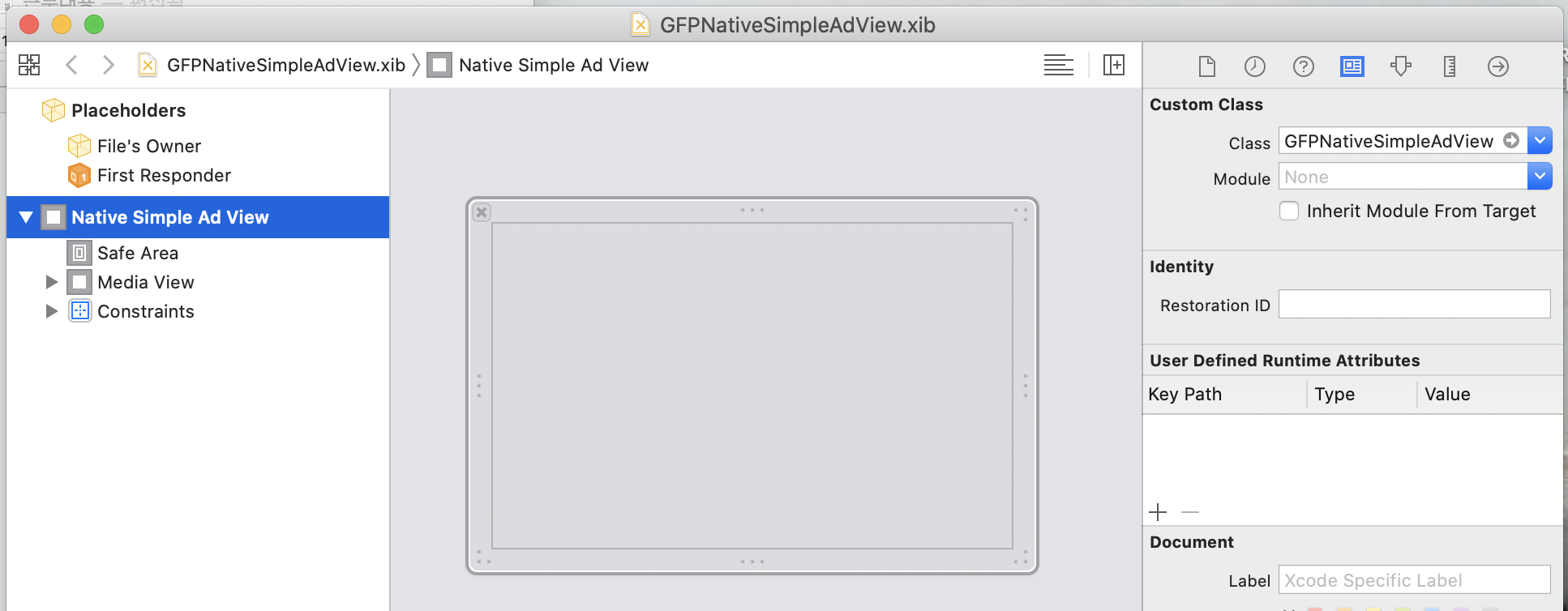
Create a view (xib) for the native ad, and in Xcode's Identity Inspector tab, set the Custom Class to GFPNativeSimpleAdView.
-
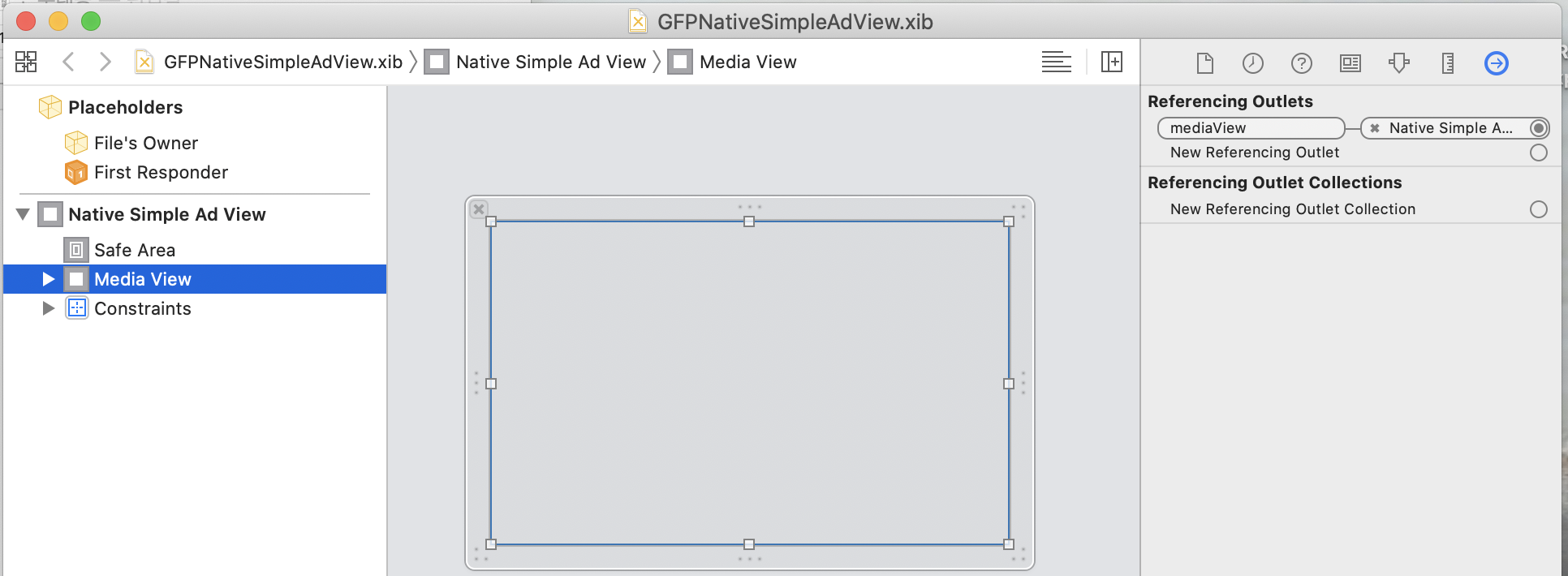
Create each asset view (title, body, etc.) that makes up the native ad view, and connect them to the corresponding outlets of GFPNativeSimpleAdView in the Connections Inspector tab.
GFPNativeSimpleAdView inherits from GFPNativeBaseView, and the mediaView outlet is defined in GFPNativeBaseView.h.
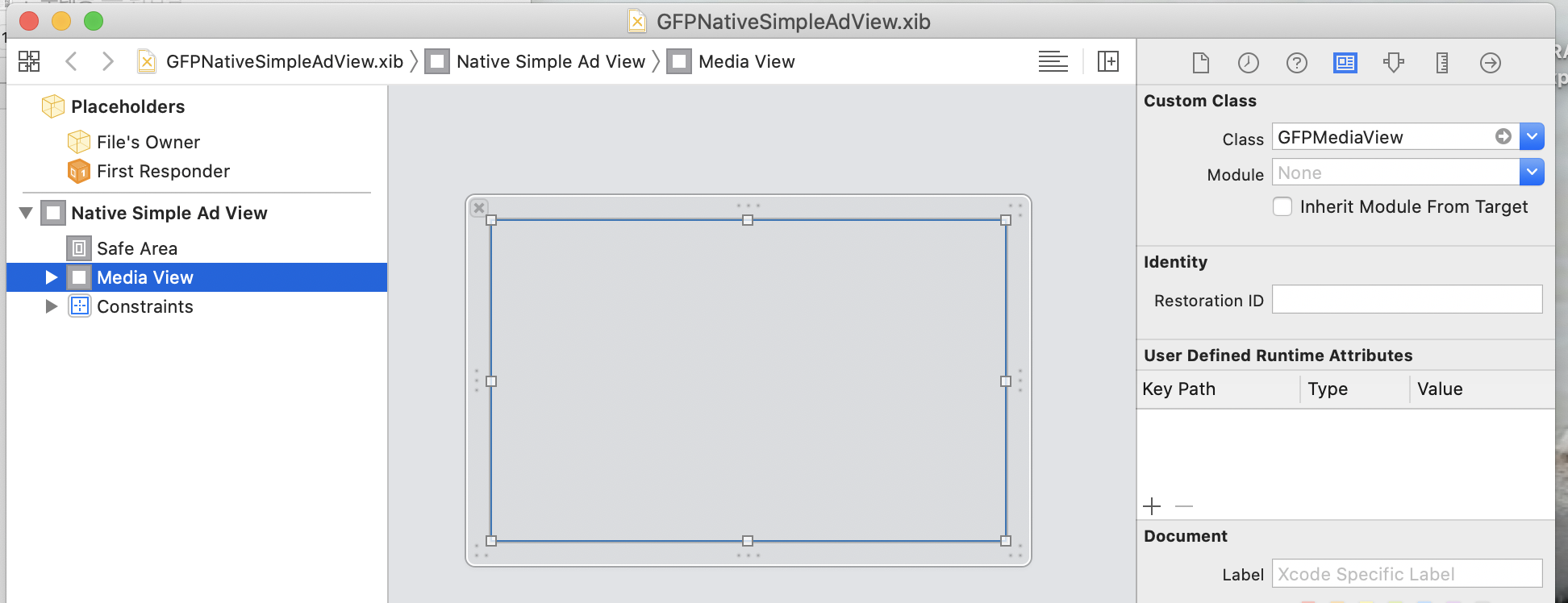
- The mediaView used to display the ad's video or image must also have its Custom Class set to GFPMediaView.
- After loading the native ad, you can implement it as shown below.
- Swift
- Objective-C
func adLoader(_ unifiedAdLoader: GFPAdLoader!, didReceive nativeSimpleAd: GFPNativeSimpleAd!) {

    // Register native ad object and delegate
    self.nativeSimpleAd = nativeSimpleAd
    self.nativeSimpleAd?.delegate = self

    // Setting the native ad on the view object starts mediaView rendering and view tracking.
    self.nativeSimpleAdView?.nativeAd = nativeSimpleAd

    // Add subview
    self.view.addSubview(self.nativeSimpleAdView)
}
- (void)adLoader:(GFPAdLoader *)unifiedAdLoader didReceiveNativeSimpleAd:(GFPNativeSimpleAd *)nativeSimpleAd {

    // Register native ad object and delegate
    self.nativeSimpleAd = nativeSimpleAd;
    self.nativeSimpleAd.delegate = self;

    // Setting the native ad on the view object starts mediaView rendering and view tracking.
    self.nativeSimpleAdView.nativeAd = nativeSimpleAd;

    // Add subview
    [self.view addSubview:self.nativeSimpleAdView]
}
GFPNativeSimpleAdDelegate
Events are delivered when the native ad is shown or clicked.
On Ad Impression
- Swift
- Objective-C
func nativeSimpleAdWasSeen(_ nativeSimpleAd: GFPNativeSimpleAd) {
    ...
}
- (void)nativeSimpleAdWasSeen:(GFPNativeSimpleAd *)nativeSimpleAd {
    ...
}
On Ad Rendered
- Swift
- Objective-C
func nativeSimpleAdWasRendered(_ nativeSimpleAd: GFPNativeSimpleAd) {
    ...
}
- (void)nativeSimpleAdWasRendered:(GFPNativeSimpleAd *)nativeSimpleAd {
    ...
}
On Click
- Swift
- Objective-C
func nativeSimpleAdWasClicked(_ nativeSimpleAd: GFPNativeSimpleAd) {
    ...
}
- (void)nativeSimpleAdWasClicked:(GFPNativeSimpleAd *)nativeSimpleAd {
    ...
}
On Rendering Error
- Swift
- Objective-C
func nativeSimpleAd(_ nativeSimpleAd: GFPNativeSimpleAd, didFailWithError error: GFPError) {
    ...
}
- (void)nativeSimpleAd:(GFPNativeSimpleAd *)nativeSimpleAd didFailWithError:(GFPError *)error {
    ...
}
On Ad Media View Size Change
Since Native Simple is a single-image ad, upon receiving this event you must update the size of the Native Simple Ad View and the Media View.
- Swift
- Objective-C
func nativeSimpleAd(_ nativeSimpleAd: GFPNativeSimpleAd, didChangeMediaViewSizeWith size: CGSize) {
    ...
}
- (void)nativeSimpleAd:(GFPNativeSimpleAd *)nativeSimpleAd didChangeMediaViewSizeWith:(CGSize)size {
    ...
}
On Ad Muted by User
When an ad is muted, the service is notified via a callback. After muting, NAMSDK displays a message saying "This ad will no longer be shown." Whether to remove the ad from the screen or keep it visible is determined by the service's policy.
- Swift
- Objective-C
func nativeSimpleAdWasMuted(_ nativeSimpleAd: GFPNativeSimpleAd) {

}
- (void)nativeSimpleAdWasMuted:(GFPNativeSimpleAd *)nativeSimpleAd {

}
On Mute Cancelled
- Swift
- Objective-C
func nativeSimpleAdWasCanceledMute(_ nativeSimpleAd: GFPNativeSimpleAd) {

}
- (void)nativeSimpleAdWasCanceledMute:(GFPNativeSimpleAd *)nativeSimpleAd {

}
In-App Browser Presented / Dismissed
Called when the default in-app browser is presented or dismissed after an ad click.
- Swift
- Objective-C
func nativeSimpleAdDidPresentDefaultInAppBrowser(_ nativeSimpleAd: GFPNativeSimpleAd) {
    // In-app browser presented
}

func nativeSimpleAdDidDismissDefaultInAppBrowser(_ nativeSimpleAd: GFPNativeSimpleAd) {
    // In-app browser dismissed
}
- (void)nativeSimpleAdDidPresentDefaultInAppBrowser:(GFPNativeSimpleAd *)nativeSimpleAd {
    // In-app browser presented
}

- (void)nativeSimpleAdDidDismissDefaultInAppBrowser:(GFPNativeSimpleAd *)nativeSimpleAd {
    // In-app browser dismissed
}
Lazy Loading Media Load Success / Failure
Called when media loading completes or fails when Lazy Loading is in use.
- Swift
- Objective-C
func nativeSimpleAdDidLoadMedia(_ nativeSimpleAd: GFPNativeSimpleAd) {
    // Media loading completed
}

func nativeSimpleAdDidFail(toLoadMedia nativeSimpleAd: GFPNativeSimpleAd) {
    // Media loading failed
}
- (void)nativeSimpleAdDidLoadMedia:(GFPNativeSimpleAd *)nativeSimpleAd {
    // Media loading completed
}

- (void)nativeSimpleAdDidFailToLoadMedia:(GFPNativeSimpleAd *)nativeSimpleAd {
    // Media loading failed
}
Others
Ad Invalidation Check
Native simple ads have an expiration time, so when displaying preloaded and cached ads, you must use the isAdInvalidate method to check if the ad has expired. If you display an expired ad, you will not receive compensation for ad impressions.
- Swift
- Objective-C
func adLoader(_ unifiedAdLoader: GFPAdLoader!, didReceive nativeSimpleAd: GFPNativeSimpleAd!) {

    // Register native ad object and delegate
    self.nativeSimpleAd = nativeSimpleAd
    self.nativeSimpleAd?.delegate = self

    // Check if ad is already expired or invalidated, and do not show ad if that is the case.
    // You will not get paid to show an invalidated ad.
    if nativeSimpleAd.isAdInvalidate {
        print("This ad has been invalidated. Try again!")
        return
    }

    // Setting the native ad on the view object starts mediaView rendering and view tracking.
    self.nativeSimpleAdView?.nativeAd = nativeSimpleAd

    // Add subview
    self.view.addSubview(self.nativeSimpleAdView!)
}
- (void)adLoader:(GFPAdLoader *)unifiedAdLoader didReceiveNativeSimpleAd:(GFPNativeSimpleAd *)nativeSimpleAd {

    // Register native ad object and delegate
    self.nativeSimpleAd = nativeSimpleAd;
    self.nativeSimpleAd.delegate = self;

    // Check if ad is already expired or invalidated, and do not show ad if that is the case.
    // You will not get paid to show an invalidated ad.
    if (nativeSimpleAd.isAdInvalidate) {
        NSLog(@"This ad has been invalidated. Try again!");
        return;
    }

    // Setting the native ad on the view object starts mediaView rendering and view tracking.
    self.nativeSimpleAdView.nativeAd = nativeSimpleAd;

    // Add subview
    [self.view addSubview:self.nativeSimpleAdView];
}